

Live streamers often ask a practical question. How can viewers see the chat while watching the stream itself? When the conversation stays hidden inside a platform’s chat box, viewers who watch on smart TVs, embedded players, or shared screens miss the interaction completely.
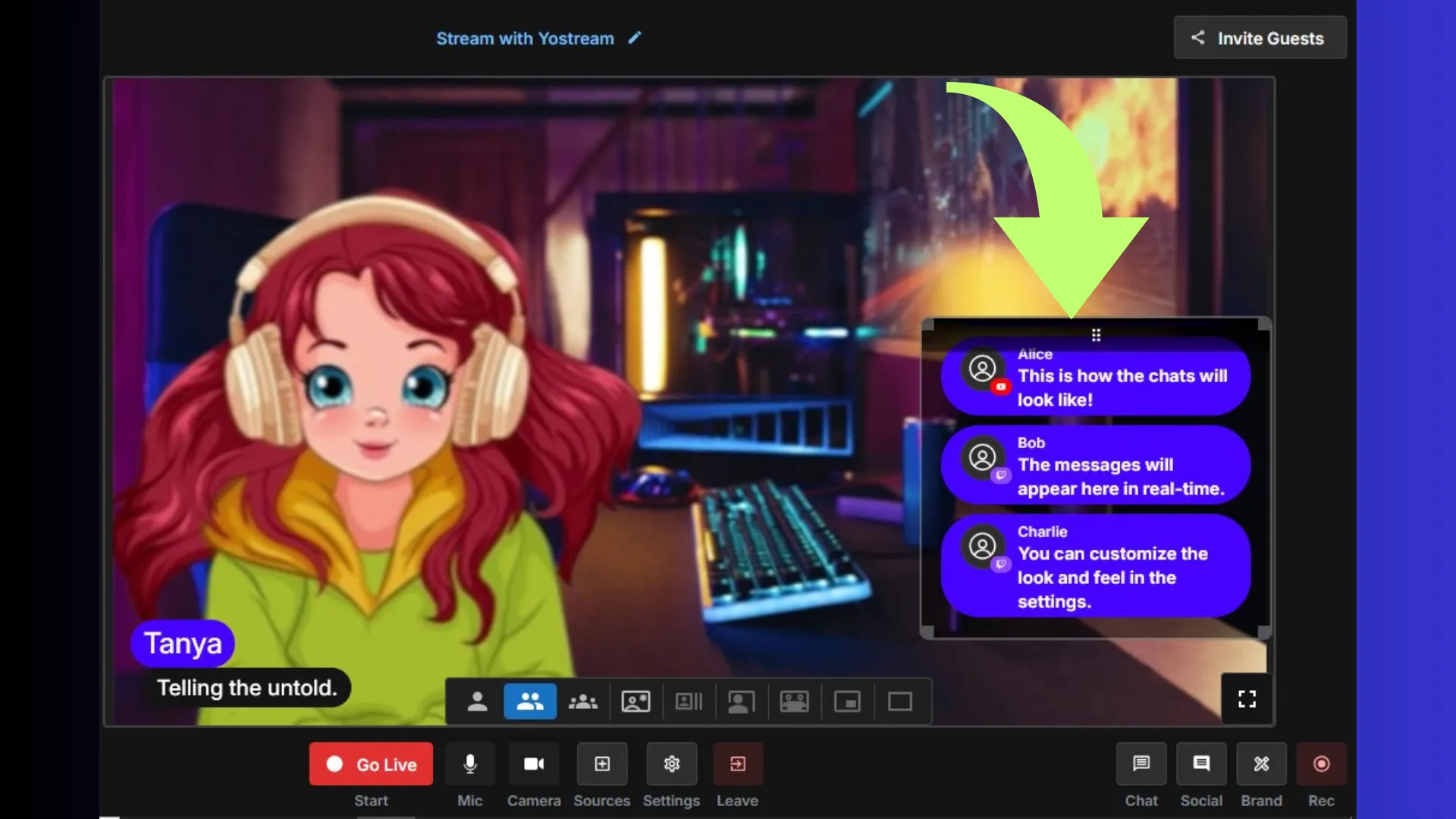
Yostream has launched an Embedded Chat feature for live streams that displays unified audience messages directly on the stream canvas. Chat messages coming from multiple platforms can appear inside the broadcast video in real time. This approach allows viewers to see the audience conversation while watching the content.
For creators who rely on engagement, this solves a long-standing problem in live streaming. The audience conversation becomes part of the broadcast instead of remaining hidden on individual platforms.
The sections below explain how embedded chat works, why it improves engagement, and what benefits live streamers gain when viewer messages appear on screen.
What Is Embedded Chat for Live Streams?
Embedded chat is an on-screen chat overlay that displays viewer comments directly within a live video stream.
Instead of showing chat only on the streaming platform interface, messages appear inside the video itself.
This allows viewers to:
- see questions from the audience
- understand the host’s responses
- follow real-time reactions during the broadcast
Example Scenario
A streamer broadcasting to YouTube Live, Facebook Live, and Twitch may receive comments from all three platforms.
With embedded chat enabled, those messages can appear directly inside the video stream as they arrive.
How Embedded Chat Works in Modern Live Streaming
Most live streaming workflows include several components working together.
Typical Live Streaming Architecture
| Component | Role in Streaming |
|---|---|
| Encoder | Sends video feed to platforms |
| Streaming protocol | Delivers video to servers |
| Chat system | Handles viewer messages |
| Streaming platform | Distributes the broadcast |
Many traditional setups rely on OBS Studio, a desktop streaming encoder that sends video using RTMP (Real Time Messaging Protocol) to platforms like YouTube Live or Facebook Live.
Modern browser-based streaming platforms increasingly use WebRTC (Web Real-Time Communication) to deliver lower latency live video directly from the browser.
Where Embedded Chat Fits
Embedded chat acts as a chat overlay layer placed inside the video canvas during the broadcast.
Workflow example:
- Streamer connects social media platforms
- Live broadcast begins
- Viewer comments appear across platforms
- Chat messages are aggregated
- Messages display inside the video stream
This process is sometimes called a multistream chat aggregator.
Why Streamers Want Chat Visible on the Stream
Live streaming is built around audience interaction. When chat remains hidden, viewers watching from outside the platform miss the conversation.
Situations Where Chat Visibility Matters
- smart TV viewing
- embedded video players on websites
- conference or classroom screens
- podcast livestream recordings
When chat appears on screen, the audience understands the full context of the conversation.
Benefits of Yostream Embedded Chat for Live Streamers
1. Visible Audience Engagement
Streams with visible chat feel more authentic. Viewers can see reactions, questions, and feedback happening in real time.
This improves:
- audience trust
- participation levels
- perceived community activity
2. Unified Conversations Across Platforms
Creators often multistream to several platforms simultaneously.
Without a unified system, conversations remain fragmented.
Example
| Platform | Chat Location | Viewer Visibility |
|---|---|---|
| YouTube Live | Platform chat window | Hidden from other viewers |
| Facebook Live | Comment section | Platform specific |
| Twitch | Twitch chat panel | Separate audience |
Embedded chat merges those messages into one feed that appears on the broadcast.
This creates one visible audience conversation across all platforms.
3. Stronger Interaction for Podcasts and Discussions
Podcast livestreams often rely heavily on audience questions.
Displaying chat messages on screen allows hosts to respond directly to viewer comments during the broadcast.
Benefits include:
- clearer audience questions
- smoother conversation flow
- more natural engagement
4. Improved Experience for External Viewers
Many viewers watch streams outside the platform interface.
Common viewing environments include:
- smart televisions
- event screens
- embedded players on websites
In these situations, the platform chat window disappears. Embedded chat ensures the conversation remains visible.
5. Simplified Setup for Streamers
Many streamers previously relied on complicated overlay systems.
Typical workflows required:
- OBS Studio browser sources
- third-party chat widgets
- custom overlay graphics
Browser-based platforms reduce this complexity by integrating the chat overlay directly inside the streaming studio.
Which Creators Benefit Most from Embedded Chat?
Embedded chat is especially useful for creators whose content depends on audience interaction.
Creator Categories
| Creator Type | How Embedded Chat Helps |
|---|---|
| Gamers | Displays viewer reactions during gameplay |
| Podcasters | Shows audience questions live |
| Educators | Allows students to interact |
| Journalists | Shows audience responses during coverage |
| Community creators | Encourages participation |
For these formats, the audience conversation becomes part of the storytelling.
How Embedded Chat Supports Multistreaming
Multistreaming allows creators to broadcast simultaneously to multiple platforms.
Popular multistreaming tools include:
- StreamYard
- Restream
- browser-based streaming studios
However, multistreaming creates a challenge.
Each platform has its own chat system.
Without aggregation:
- conversations split across platforms
- viewers cannot see each other’s comments
- hosts struggle to follow discussions
A multistream chat aggregator solves this problem by combining messages into one unified chat feed.
Frequently Asked Questions About Embedded Chat
1. Can viewers see chat messages directly inside the video stream?
Yes. Embedded chat overlays display audience messages within the live video itself.
2. Does embedded chat work with multistreaming?
Yes. Messages from platforms such as YouTube Live, Facebook Live, and Twitch can be combined into a single chat feed.
3. Why do streamers show chat on screen?
Displaying chat helps streamers:
- highlight audience participation
- respond to comments publicly
- make the stream more interactive
4. Does embedded chat improve engagement?
Streams with visible audience conversations often encourage more viewers to participate in chat discussions.
5. Do you need software like OBS Studio for chat overlays?
Some setups use OBS Studio and browser sources for overlays. However, browser-based streaming studios can integrate chat overlays directly.
Why Audience Visibility Is the Future of Live Streaming
Live streaming differs from recorded video because interaction happens in real time.
When the audience conversation becomes visible:
- viewers feel included in the discussion
- hosts respond naturally to comments
- the stream becomes a shared experience
Features such as embedded chat move live streaming closer to its original goal. A real time conversation between creators and viewers.
For creators who rely on community engagement, this type of functionality can make broadcasts more interactive without adding technical complexity.