

Hybrid events have transformed the way we connect, blending the energy of in-person gatherings with the accessibility of virtual participation. Whether you're organizing a corporate meeting, a conference, or a workshop, setting up a hybrid event quickly can seem daunting—but it doesn’t have to be. This article will guide you through the process of creating a hybrid event in under 60 minutes. Let’s dive in to deliver a clear, actionable, and value-packed guide for your next hybrid conference or event.
What Are Hybrid Events and Why Are They Beneficial?
Understanding Hybrid Events
A hybrid event combines in-person and virtual components, allowing attendees to participate either at a physical venue or online via live streaming. For example, a hybrid conference might feature keynote speakers on-site while streaming their talks to a global virtual audience, with interactive elements like live Q&A for both groups.
Benefits of Hybrid Events
Hybrid events offer unmatched flexibility and reach, making them ideal for modern event planners. Here’s why they’re so powerful:
- Global Accessibility: Virtual attendance removes geographical barriers, expanding your audience.
- Cost Efficiency: Reduced travel and venue costs for virtual attendees and speakers.
- Data Insights: Track engagement metrics (e.g., attendance, session drop-offs) for both in-person and virtual participants.
- Sustainability: Fewer in-person attendees lower the event’s carbon footprint.
- Inclusivity: Attendees can choose their preferred format, accommodating diverse needs.
| Benefit | In-Person Only | Virtual Only | Hybrid Event |
|---|---|---|---|
| Audience Reach | Limited by venue | Global | Global + Local |
| Cost for Attendees | High (travel, lodging) | Low | Flexible |
| Engagement Data | Limited | Extensive | Extensive |
| Carbon Footprint | High | Low | Moderate |
How to Set Up a Hybrid Event Quickly in Under 60 Minutes
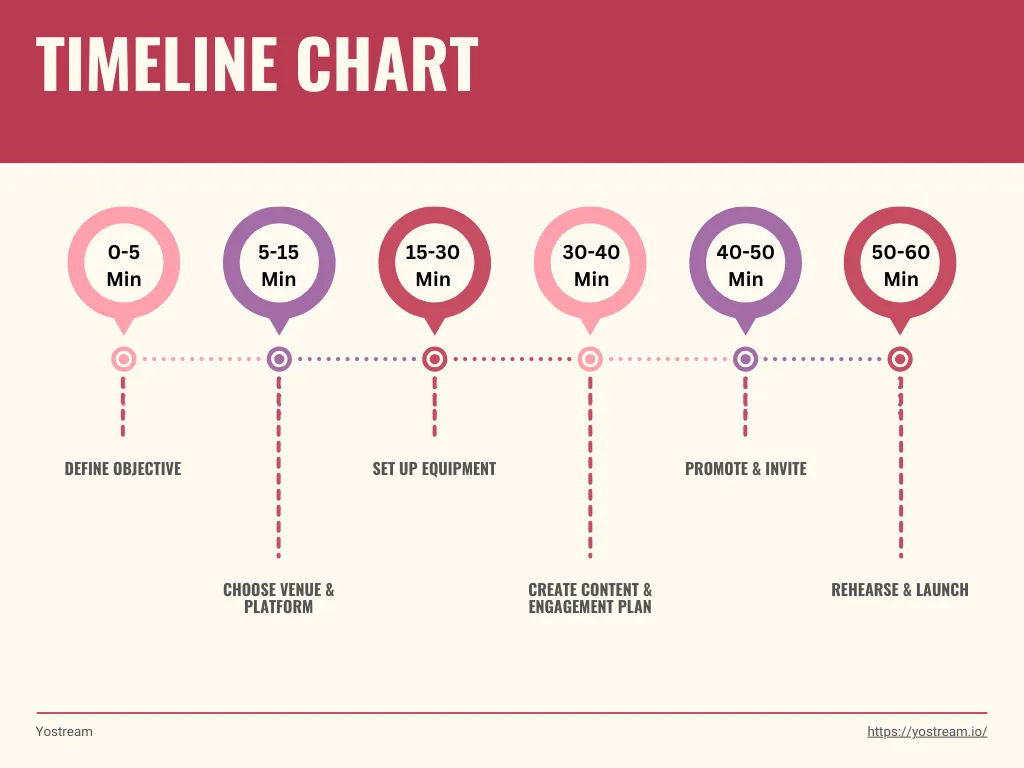
You’ve got 60 minutes to organize a hybrid event setup for corporate meetings or a small conference. Here’s a step-by-step guide to make it happen with easy steps to organize a hybrid event:
Step 1: Define Your Objective (5 Minutes)
- What’s the goal? Is it a product launch, training session, or networking event? Clear objectives guide your setup.
- Who’s your audience? Identify the split between in-person and virtual attendees to tailor content.
- Example: For a corporate meeting, aim to train 50 in-person staff and 100 remote employees on a new tool.
Step 2: Choose a Venue and Platform (10 Minutes)
Venue: Select a small, tech-ready space (e.g., a conference room with strong Wi-Fi). Ensure it has power outlets and space for cameras.
Platform: Use Yostream, the best live streaming software for hybrid events. Its features include:
- Browser-Based Simplicity: No downloads, ideal for quick setup.
- Custom Branding: Give your event a professional look with custom logos, background, themes, banners, etc.
- Multi-Platform Streaming: Broadcast to YouTube, Twitch, and more simultaneously.
- Interactive Features: Add guests, 4K recording, and single interface chat to engage audiences from different platforms.
Why Yostream? Its free tier and intuitive interface make it perfect for fast hybrid event planning tips, even on a budget. Setup takes under 5 minutes.
Step 3: Set Up Equipment (15 Minutes)
- Camera: Use a 1080p webcam or smartphone camera (yostream.io supports mobile streaming).
- Microphone: A USB mic (e.g., Blue Yeti, ~$50) ensures clear audio. Poor audio is a top complaint in hybrid events.
- Lighting: Use a ring light or natural light for professional visuals.
- Internet: Ensure 5-10 Mbps upload speed for 1080p streaming. Yostream optimizes for lower bandwidth.
- Tip: Test your setup on Yostream’s dashboard to confirm video and audio quality.
Step 4: Create Content and Engagement Plan (10 Minutes)
- Content: Prepare a concise agenda (e.g., 20-minute keynote, 10-minute Q&A). Share slides or visuals via Yostream’s screen-sharing feature.
- Engagement: Plan polls or Q&A sessions. Yostream’s chat overlay lets you respond to virtual comments in real time.
- Example: For a hybrid conference, poll attendees on their biggest challenge to spark discussion.
Step 5: Promote and Invite (10 Minutes)
- Invitations: Send calendar invites with clear instructions for in-person (venue details) and virtual attendees.
- Promotion: Share a quick post on social media or email 24-48 hours prior.
- Tip: Use Eventbrite for ticketing if you’re selling access.
Step 6: Rehearse and Launch (10 Minutes)
- Rehearse: Do a 5-minute dry run with your team to test transitions and tech.
- Launch: Start the stream on yostream, welcome both audiences, and monitor engagement via its dashboard.
Essential Pre-Setup Considerations for a Quick Hybrid Event Setup
Before diving into the setup, address these considerations to avoid hiccups:
- Audience Split: Estimate in-person vs. virtual attendees to allocate resources (e.g., 70% virtual may need more streaming focus).
- Tech Reliability: Verify internet stability and have a backup hotspot.
- Accessibility: Ensure captions and multi-language options for inclusivity.
- Budget: A minimal setup (webcam, mic, yostream.io free tier) costs ~$100.
- Team Roles: Assign a moderator for virtual chat and a tech lead for in-person AV.
- Confirm venue Wi-Fi and power
- Test Yostream account
- Secure camera, mic, and lighting
- Draft agenda and polls
- Prepare attendee instructions
How to Engage Both In-Person and Virtual Attendees Efficiently
Engagement is the heart of a successful hybrid event. Here’s how to keep both audiences captivated:
- Unified Content: Deliver the same core message but tailor delivery. For example, acknowledge virtual attendees by name during Q&A.
- Interactive Tools: Use poll, Q&A, and chat to involve everyone. Example: Ask, “What’s your top priority this quarter?” and display results live.
- Networking: Create virtual breakout rooms on yostream.io and in-person networking zones. Tools like twine can add “serendipitous” connections.
- Real-Time Moderation: Assign a team member to monitor virtual chat and relay questions to the speaker.
- Post-Event Access: Record the event via Yostream for on-demand viewing, increasing value for virtual attendees.
What Are Common Mistakes to Avoid When Setting Up a Hybrid Event?
Rushing into a hybrid event without preparation can lead to pitfalls. Here are mistakes to sidestep:
- Poor Audio Quality: Invest in a decent mic. Viewers tolerate bad video but not bad sound.
- Ignoring Virtual Attendees: Engage them actively via polls or shout-outs to avoid isolation.
- Tech Overload: Stick to simple tools like Yostream to avoid confusing attendees.
- No Rehearsal: Skipping a dry run risks tech failures. Test everything in advance.
- Under-Promotion: Announce the event 24-48 hours ahead on social media or email.
| Mistake | Solution |
|---|---|
| poor Audio | Use a USB mic (~$50) |
| Ignoring Virtual Attendees | Use chat and polls |
| Tech Overload | Simplify with Yostream’s all-in-one platform |
| No Rehearsal | Run a 5-minute test |
| Under-Promotion | Share on social media and email |
Why Choose Yostream as the Best Live Streaming Software?
Yostream stands out for hybrid event setup for corporate meetings and conferences due to its ease, affordability, and robust features:
- Free Tier: Start streaming without upfront costs, perfect for quick setups.
- Mobile Streaming: Use your smartphone for on-the-go events with 5G support.
- Multi-Platform Reach: Multistream to YouTube, Twitch, and other social media platforms for maximum exposure.
- User-Friendly: Browser-based with no downloads, saving setup time.
- Privacy Controls: Secure streams with password protection or whitelisting.
FAQs About Setting Up a Hybrid Event
1. What’s the fastest way to set up a hybrid event?
Focus on simplicity: pick a reliable live streaming platform, use a tech-ready venue, and minimal equipment (a webcam and a decent mic). Follow the 6-step process outlined earlier to keep everything under 60 minutes. Pre-testing your setup saves time and stress.
2. How much does a basic hybrid event cost?
You can pull off a small event for around $100—covering a good USB microphone ($50), a webcam ($50), and free streaming software. For larger events, professional AV equipment or a bigger venue might push costs to $500 or more, depending on scale.
3. Can I use my phone for streaming a hybrid event?
Absolutely! Most modern smartphones have high-quality cameras that work great for streaming. Just ensure you have a stable internet connection (5-10 Mbps upload speed) and a tripod for steady footage. Many platforms, including yostream.io, support mobile streaming for quick setups.
4. How do I keep virtual attendees engaged?
Make them feel included with interactive elements like live polls, Q&A sessions, or chat features. Acknowledge virtual participants by name during the event, and consider offering recordings for on-demand access. A dedicated moderator to manage online questions helps, too.
5. What’s the biggest challenge with hybrid events?
Balancing engagement between in-person and virtual audiences is tricky. It’s easy to focus on the room and neglect online attendees. Plan unified content, use interactive tools, and rehearse transitions to ensure both groups feel valued and connected.
Your Path to a Seamless Hybrid Event
Setting up a hybrid event in under 60 minutes is entirely achievable with the right tools and strategy. By defining clear objectives, leveraging yostream as the best live streaming software, and engaging both in-person and virtual attendees, you can create a memorable hybrid conference or corporate meeting. Avoid common mistakes like poor audio or neglecting virtual participants, and use the pre-setup checklist to stay organized. With easy steps to organize a hybrid event and fast hybrid event planning tips, you’re ready to deliver value to your audience.