


The Quarter Final of the FIFA World Cup 2022 between Brazil and Croatia was a shocker for the former where it was defeated in a breath-stopper penalty shootout. It was the first-ever victory for Croatia against the five-time champions in any soccer match, making it an unforgettable event. When it was live streamed on YouTube on December 9, 2022, by a popular Brazilian streamer, Casimiro, on his YouTube channel - CazéTV, it stunned everyone by becoming YouTube’s one of most viewed live streams ever 6.1 million viewers at its peak time (the highest being Felix Baumgartner's jump which was streamed on Red Bull's official channel). This record, which was possible only because of crazy soccer fans worldwide, couldn’t uphold the title for a long time when ISRO stunned it on August 23, 2023.
Live Streaming Of ISRO’s Chandrayaan-3 Mission Breaks YouTube Record:
The third lunar mission, Chandrayaan-3, launched by the Indian Space Research Organisation (ISRO), shattered every single record when the Vikram lander smoothly touched the south pole of the moon before releasing the Pragyaan rover from its belly to conduct experiments on the lunar surface. This spectacular event was watched live by a whopping 8.06 million concurrent viewers on YouTube who were eagerly waiting to witness the final descent of the lander. This historical event of the Chandrayaan-3’s moon landing is now officially the most-viewed YouTube live stream in the world.
It is now obvious that watching an event, as it unfolds in real time, has a separate fan base. From soccer matches and space missions (like SpaceX’s Crew Dragon Demo-2) to product launching (like the Apple Event of September 2022) and celebrity trials (like Johnny Depp vs. Amber Heard), viewers feel like insiders and consider themselves an essential part of an online community that shares common interests.
Sitting at the heart of everything mentioned above is the spectacular phenomenon of live streaming which refers to the broadcasting of video and audio content over the Internet in real time. Instead of downloading or listening to previously recorded content, live streaming enables users to connect and engage with content creators, fellow viewers, and a wide array of worldwide audiences. There is nothing artificial in it as users become an active part of the real action by offering their thoughts and information, asking questions, and sharing reactions while having a front-row seat to an online event.
Live Stream Meaning in Simple Words
Live streaming is the real-time broadcasting of video and audio content over the internet to viewers who watch simultaneously. Think of it as television broadcasting, but instead of using radio waves, you use the internet to reach your audience instantly.
When you live stream, you're creating content that viewers see as it happens, with minimal delay (typically 3-30 seconds). This creates an immediate connection between broadcaster and audience, enabling real-time interaction through comments, reactions, and chat messages.
Key Characteristics of Live Streaming:
- Real-time delivery: Content is broadcast as it's being created
- Interactive audience engagement: Viewers can comment and react instantly
- Wide reach potential: Can broadcast to unlimited viewers globally
- Immediate feedback: Content creators receive instant audience responses
- Authentic experience: Unedited, spontaneous content builds trust
What Is a Live Stream and How Does It Work?
A live stream is a continuous flow of audio and video data transmitted over the internet in real-time. The technical process involves several sophisticated steps that happen within seconds.
The Live Streaming Process Explained:
A user can start live streaming either by running a traditional downloaded software or staying away from technical complexities by using a browser-based live streaming software. The downloadable software usually requires an intense machine with the user having a reasonable level of technical proficiency whereas when it comes to live streaming directly from a web browser, the requirement of a baseline technical competence diminishes. Any content creator, be it a newcomer or an expert, can stream from a browser creating professional-looking content in a hassle-free manner. Let’s have a brief rundown on the working of live streaming software and get the gist of live stream content that originates at the creator’s end and travels all the way to reach a viewer's device:
- Capturing Audio-Video: Initially, the creator’s audio-video signals are recorded by the device he/she uses for the purpose of creating live streaming content. Any external camera or mic attached to the device can also be used other than the same built-in features.
- Encoding: The large files are compressed and segmented into different small files and formats that support the receiver’s device.
- Protocol: The tiny data packets are transferred to a server with the help of a protocol. A protocol is like a teacher who, after the morning assembly finishes, manages the queues of kids and ensures they reach their classroom without any difficulty.
- Server: The server is the super guru whose job, out of many, primarily is to arrange data in the correct order and send it to the viewer while ensuring its security and adjusting the bitrates to make sure it plays smoothly on the receiver’s device, based on the available Internet speed.
- Content Delivery Network (CDN): The server sends a copy of the original data to the CDN, a group of servers located in the geographical proximity of the receiver.
- CDN To Viewer: Located somewhere near the receiver, the CDN sends the data to the end user in real time. The reduced physical distance ensures a smooth playback at the receiver’s device.
Technical Requirements for Live Streaming:
| Component | Minimum Requirement | Recommended |
|---|---|---|
| Upload Speed | 5 Mbps | 10+ Mbps |
| CPU | Dual-core 2.8GHz | Quad-core 3.0GHz+ |
| RAM | 4GB | 8GB+ |
| Graphics Card | Integrated | Dedicated GPU |
Difference Between Streaming and Live Streaming
Understanding the distinction between regular streaming and live streaming is crucial for choosing the right content delivery method.
Regular Streaming (Video-on-Demand)
Regular streaming or Video-on-Demand involves pre-recorded content that viewers can access anytime. Examples include Netflix movies, YouTube videos, or Spotify music.
Characteristics:
- Content is pre-produced and edited
- Viewers can pause, rewind, and fast-forward
- Available 24/7 for consumption
- Higher video quality due to pre-processing
- No real-time interaction with creators
Live Streaming
Live streaming broadcasts content as it happens, creating an immediate viewing experience.
Characteristics:
- Content is produced and consumed simultaneously
- Limited viewer control (can't pause or rewind)
- Scheduled viewing times
- Slightly lower quality due to real-time constraints
- Direct interaction between creators and viewers
Comparison Table:
| Feature | Regular Streaming | Live Streaming |
|---|---|---|
| Timing | On-demand | Real-time |
| Interaction | Comments only | Live chat, reactions |
| Production | Pre-recorded | Live production |
| Quality | Higher (optimized) | Good (real-time constraints) |
| Accessibility | Always available | Time-specific |
| Editing | Fully edited | Minimal editing |
Is Live Streaming the Same as Video Calling?
No, live streaming and video calling serve different purposes and have distinct characteristics. While both use real-time video technology, they differ significantly in audience, interaction, and functionality.
Live Streaming Characteristics:
- One-to-many broadcasting: Single creator reaches multiple viewers
- Public or semi-public: Often accessible to large audiences
- Limited interaction: Viewers communicate through chat and reactions
- Content-focused: Emphasis on entertainment, education, or information sharing
- Scalable: Can reach thousands of simultaneous viewers
Video Calling Characteristics:
- Many-to-many communication: All participants can speak and be seen
- Private sessions: Restricted to invited participants
- Full interaction: Complete conversational capabilities
- Communication-focused: Emphasis on dialogue and collaboration
- Limited scale: Typically 2-50 participants
When to Choose Each:
Choose Live Streaming for:
- Broadcasting events or presentations
- Building audience communities
- Educational content delivery
- Entertainment and gaming
- Marketing and brand building
Choose Video Calling for:
- Business meetings and conferences
- Personal conversations
- Collaborative work sessions
- Consultations and interviews
- Team communications
Types of Live Streaming
Live streaming encompasses various formats and applications, each serving specific audience needs and business objectives.
1. Entertainment Live Streaming
- Gaming streams: Real-time gameplay with audience interaction
- Music performances: Live concerts and acoustic sessions
- Talk shows: Interactive discussions and interviews
- Reality content: Behind-the-scenes and lifestyle streaming
2. Educational Live Streaming
- Online courses: Real-time learning with Q&A sessions
- Webinars: Professional development and training
- Tutorials: Step-by-step instructional content
- Academic lectures: University and school broadcasts
3. Business Live Streaming
- Product launches: Real-time product demonstrations
- Corporate communications: Company meetings and announcements
- Customer support: Live troubleshooting and assistance
- Sales presentations: Interactive product showcases
4. Event Live Streaming
- Conferences: Professional and industry events
- Weddings: Sharing special moments with distant family
- Sports: Live game broadcasts and commentary
- Religious services: Worship and community gatherings
5. Social Live Streaming
- Personal updates: Sharing daily life with followers
- Community building: Creating engaged follower groups
- Q&A sessions: Direct audience interaction
- Collaborations: Multi-creator content sessions
What Equipment Do I Need for Live Streaming?
Setting up for live streaming requires careful consideration of your budget, content type, and quality expectations. Here's a comprehensive breakdown of essential and optional equipment.
Essential Equipment for Beginners:
1. Camera Options
- iPhone 12+ or Android equivalent
- Built-in stabilization
- 1080p minimum resolution
- Cost: $0 (if you own one)
Webcam
- Logitech C920 or equivalent
- 1080p resolution at 30fps
- Auto-focus and light correction
- Cost: $50-100
- Canon EOS M50 Mark II
- Sony A6400
- 4K capability with clean HDMI output
- Cost: $500-1,500
2. Audio Equipment
- Audio-Technica ATR2100x-USB
- Blue Yeti or Yeti Nano
- Plug-and-play setup
- Cost: $50-200
- Rode SmartLav+
- Sennheiser ME 2-II
- Hands-free operation
- Cost: $25-100
3. Lighting Solutions
- 18-inch LED ring light
- Adjustable brightness and color temperature
- Reduces shadows and improves skin tone
- Cost: $30-150
- Neewer 700W Photography Kit
- Professional diffused lighting
- Multiple light positions
- Cost: $100-300
4. Internet Connection
Upload Speed Requirements:
- 1080p streaming: 5-10 Mbps upload
- 4K streaming: 25+ Mbps upload
- Ethernet connection preferred over Wi-Fi
- Consider backup internet options
Advanced Equipment for Professionals:
Video Equipment
- Multi-camera setup: $2,000-10,000+
- Video capture cards: Elgato 4K60 Pro ($250-400)
- Professional cameras: Sony FX3, Canon R5 ($2,000-4,000)
- Gimbal stabilizers: DJI Ronin series ($300-1,500)
Audio Equipment
- Audio interfaces: Focusrite Scarlett series ($100-500)
- XLR microphones: Shure SM7B, Electro-Voice RE20 ($300-500)
- Audio mixers: Behringer Xenyx series ($50-300)
- Acoustic treatment: Sound panels and foam ($200-1,000)
Streaming Accessories
- Green screen: Collapsible backgrounds ($50-200)
- Stream deck: Elgato Stream Deck ($100-250)
- Monitor setup: Dual monitors for monitoring ($200-800)
- Tripods and mounts: Manfrotto, Joby ($50-300)
Equipment Budget Guide:
| Budget Level | Total Cost | Key Components |
|---|---|---|
| Beginner | On-demand | Smartphone, USB mic, ring light |
| Intermediate | $500-2,000 | Webcam/entry DSLR, audio interface, professional lighting |
| Professional | $2,000-10,000+ | Multiple cameras, professional audio, advanced lighting |
Best Live Streaming Software For Beginners
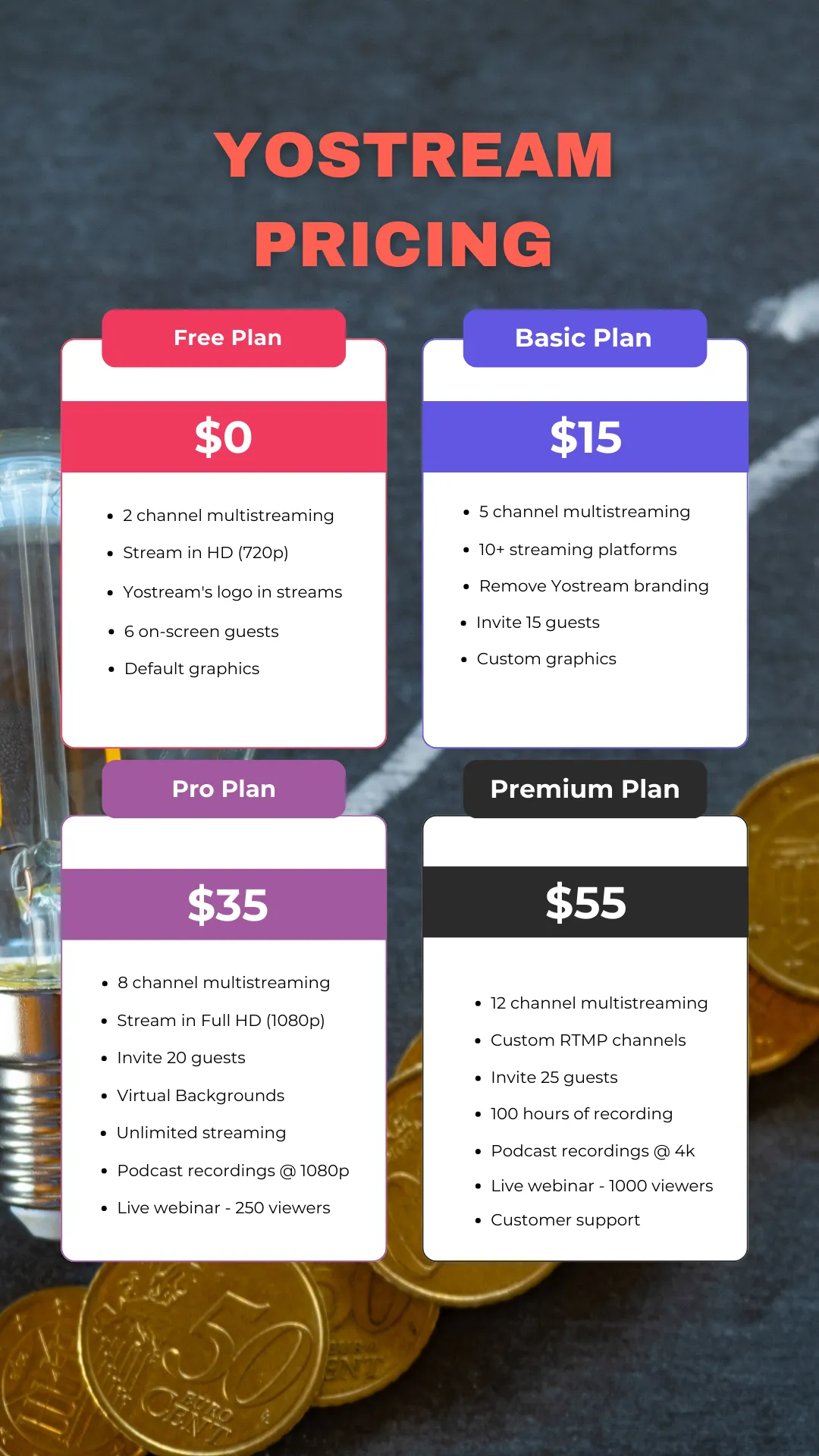
Choosing the right live streaming software significantly impacts your broadcast quality, audience engagement, and overall streaming success. Yostream stands out as the industry-leading solution, offering comprehensive features that cater to both beginners and professional streamers.
Why Yostream Is the Best Choice for Live Streaming:
1. Advanced Multi-Platform Broadcasting
- Stream to 30+ platforms simultaneously including YouTube, Facebook, Twitch, LinkedIn
- Custom RTMP support for any streaming destination
- Platform-specific optimization for maximum reach
- Centralized analytics across all platforms
- Adaptive bitrate streaming ensures optimal quality for each platform
- Real-time platform health monitoring
- Automatic failover protection prevents stream interruptions
- Custom branding and overlays for each destination
- Professional video effects and filters
- Real-time color correction and enhancement
- Green screen technology with advanced keying
- Real-time chat aggregation from all platforms
2. Superior Technical Performance
- Hardware-accelerated encoding (NVENC, QuickSync, AMF)
- Low-latency streaming with sub-second delay
- 4K streaming capability at 60fps
- Bandwidth-adaptive streaming technology
- 99.9% uptime guarantee
- Global CDN with 150+ edge locations
- Automatic stream recovery
- Real-time performance monitoring
3. Professional-Grade Production Tools
- Professional video effects and filters
- Real-time color correction and enhancement
- Real-time chat aggregation from all platforms
- Social media platforms integrated
Yostream vs. Competitors Comparison:
| Feature | Yostream | OBS Studio | Streamlabs | XSplit |
|---|---|---|---|---|
| Multi-platform Streaming | ✅ 30+ platforms | ❌ Single platform | ✅ Limited platforms | ✅ Limited platforms |
| 4K Streaming | ✅ Up to 60fps | ✅ Hardware dependent | ✅ Limited | ✅ Limited |
| Customer Support | ✅ 24/7 dedicated | ❌ Community only | ✅ Limited hours | ✅ Business hours |
| Ease of Use | ✅ Intuitive interface | ❌ Steep learning curve | ✅ User-friendly | ✅ Moderate complexity |
How to Start Live Streaming
Beginning your live streaming journey requires strategic planning and proper execution. Follow this comprehensive step-by-step guide to launch successful broadcasts.
Step 1: Define Your Streaming Goals and Niche
Identify Your Purpose:
- Entertainment: Gaming, music, comedy, lifestyle content
- Education: Tutorials, courses, skill-sharing
- Business: Marketing, customer engagement, thought leadership
- Community: Building relationships, social interaction
Target Audience Analysis:
- Demographics: Age, location, interests, viewing habits
- Platform preferences: Where does your audience spend time?
- Content consumption patterns: Peak viewing times, preferred formats
- Engagement style: Interactive vs. passive viewing preferences
Step 2: Choose Your Streaming Platforms
Primary Platform Selection:
- Best for: Educational content, tutorials, long-form content
- Audience: Broad demographic, strong search discovery
- Monetization: Ad revenue, Super Chat, channel memberships
- Best for: Gaming, creative content, interactive streams
- Audience: Gaming-focused, highly engaged community
- Monetization: Subscriptions, bits, donations
- Best for: Business content, community building
- Audience: Mature demographic, local communities
- Monetization: Fan subscriptions, Stars, brand partnerships
- Best for: Professional content, B2B marketing
- Audience: Business professionals, industry experts
- Monetization: Lead generation, business development
Step 3: Set Up Your Equipment and Software
Equipment Checklist:
- Camera (smartphone, webcam, or DSLR)
- Microphone (USB or XLR with interface)
- Lighting (ring light or softbox)
- Stable internet connection (5+ Mbps upload)
- Computer with adequate processing power
Software Configuration:
- Download and install Yostream
- Connect your camera and microphone
- Configure video settings (resolution, framerate, bitrate)
- Set up audio levels (input gain, noise suppression)
- Design your streaming layout (overlays, alerts, scenes)
Step 4: Create Compelling Content
Content Planning:
- Outline key topics and talking points
- Prepare engaging opening and closing segments
- Plan interactive elements (polls, Q&A, challenges)
- Test all technical equipment beforehand
- Introduction (2-3 minutes): Welcome viewers, explain today's topic
- Main Content (15-45 minutes): Deliver core value
- Interaction (Throughout): Respond to chat, acknowledge viewers
- Conclusion (2-3 minutes): Summarize key points, call-to-action
- Ask questions throughout your stream
- Acknowledge viewers by name when they comment
- Create recurring segments to build audience expectations
- Use visual aids to maintain interest
- Share personal stories to build connection
Step 5: Go Live and Engage Your Audience
Pre-Stream Checklist:
- Test audio and video quality
- Check internet connection stability
- Prepare backup plans for technical issues
- Announce your stream on social media
- Set up stream title and description
During Your Stream:
- Start strong: Engaging opening that hooks viewers
- Maintain energy: Consistent enthusiasm throughout
- Monitor chat actively: Respond to comments and questions
- Provide value: Educational, entertaining, or inspiring content
- End with purpose: Clear call-to-action for next steps
Common Live Streaming Challenges and Solutions
Every live streamer faces technical and content challenges. Understanding common issues and their solutions helps ensure consistent, high-quality broadcasts.
Technical Challenges
1. Poor Video Quality
- Blurry or pixelated video
- Frame drops and stuttering
- Color distortion
- Upgrade internet connection: Minimum 5 Mbps upload for 1080p
- Optimize encoding settings: Balance quality and performance
- Improve lighting conditions: Adequate illumination reduces noise
- Use Yostream's adaptive bitrate: Automatically adjusts to network conditions
2. Audio Issues
- Echo and feedback
- Background noise
- Inconsistent volume levels
- Use dedicated microphones: Avoid relying on camera audio
- Implement noise suppression: Software filters reduce unwanted sounds
- Monitor audio levels: Keep levels between -12dB and -6dB
- Use headphones: Prevent audio feedback loops
3. Internet Connection Problems
- Stream disconnections
- Buffering for viewers
- Inconsistent stream quality
- Use wired ethernet connection: More stable than Wi-Fi
- Close unnecessary applications: Reduce bandwidth usage
- Lower stream quality temporarily: Maintain consistent connection
- Have backup internet: Mobile hotspot or secondary connection
Content and Engagement Challenges
1. Low Viewer Engagement
- Few or no chat messages
- Declining viewership during stream
- Limited audience growth
- Ask engaging questions: Encourage audience participation
- Create interactive content: Polls, challenges, competitions
- Maintain consistent schedule: Build audience expectations
- Collaborate with other streamers: Cross-promote content
2. Inconsistent Content Quality
- Unprepared or rambling content
- Repetitive topics
- Lack of clear value proposition
- Develop content calendar: Plan topics in advance
- Create content templates: Structured formats for consistency
- Research trending topics: Stay relevant to audience interests
- Gather feedback regularly: Survey audience preferences
3. Burnout and Sustainability
- Declining enthusiasm
- Irregular streaming schedule
- Reduced content quality
- Set realistic goals: Sustainable growth expectations
- Take regular breaks: Prevent mental fatigue and focus of maintaining a healthy work-life balance.
- Diversify content types: Keep streaming fresh and interesting
- Build support network: Connect with other content creators
Frequently Asked Questions
1. What is the difference between live streaming and recording?
Live streaming broadcasts content in real-time as it's being created, while recording captures content for later editing and publishing. Live streaming enables immediate audience interaction and authentic, unedited experiences, whereas recorded content allows for polished, edited presentations.
2. How much internet speed do I need for live streaming?
For 1080p streaming, you need a minimum upload speed of 5 Mbps, with 10+ Mbps recommended for stability. 720p streaming requires 3-5 Mbps upload speed. Always test your connection before going live and consider using ethernet instead of Wi-Fi for better stability.
3. Can I make money from live streaming?
Yes, live streaming offers multiple monetization opportunities including donations, subscriptions, sponsorships, affiliate marketing, and selling products or services. Platforms like YouTube, Twitch, and Facebook offer built-in monetization tools.
4. What are the best times to live stream?
Optimal streaming times depend on your target audience and platform. Generally, evenings (7-10 PM) and weekends see higher engagement. Research your specific audience demographics and use platform analytics to identify when your viewers are most active.
5. Do I need expensive equipment to start live streaming?
No, you can start live streaming with basic equipment like a smartphone and good lighting. While professional equipment improves quality, content value and audience engagement matter more than expensive gear. Gradually upgrade equipment as your audience and revenue grow.
6. How do I handle negative comments during live streams?
Develop clear community guidelines and enforce them consistently. Use moderation tools to filter inappropriate content, assign trusted moderators for larger streams, and focus on positive engagement. Don't let negative comments derail your content or affect your energy.
7. What should I do if my stream crashes or disconnects?
Have backup plans ready including secondary internet connections, alternative streaming software, and pre-written announcements for technical difficulties.
8. How long should my live streams be?
Stream length depends on your content type and audience preferences. Gaming streams often run 2-4 hours, educational content works well at 30-60 minutes, and business presentations typically last 45-90 minutes. Start shorter and increase duration based on audience engagement.
9. Can I stream to multiple platforms simultaneously?
Yes, multi-platform streaming maximizes your reach and audience growth. Yostream enables simultaneous broadcasting to 30+ platforms, allowing you to build audiences across different channels while managing everything from one interface.
10. What legal considerations should I know about live streaming?
Understand copyright laws regarding music and video content, obtain necessary permissions for filming locations, respect privacy rights of people appearing in your streams, and comply with platform-specific terms of service. Consider creating clear terms and conditions for your audience.