

Quick Answer
A capture card is usually the better choice for competitive gaming and professional broadcasts where low latency and maximum reliability matter. NDI is often the better choice for creators who want a simpler, more affordable dual PC streaming setup without additional hardware.
You finally build a dual-PC streaming setup expecting smoother streams, lower CPU usage, and better production quality. Then you hit an unexpected question: capture card vs NDI for dual PC streaming.
Many streamers spend hundreds of dollars on hardware before realizing they could have achieved similar results using their existing network. Others try NDI first and discover that network bottlenecks create headaches during live broadcasts.
The choice affects your stream quality, latency, budget, setup complexity, and long-term scalability. This guide breaks down exactly how capture cards and NDI work, where each solution shines, and which one makes the most sense for your streaming goals in 2026.
🎮 What Is a Capture Card in a Dual PC Streaming Setup?
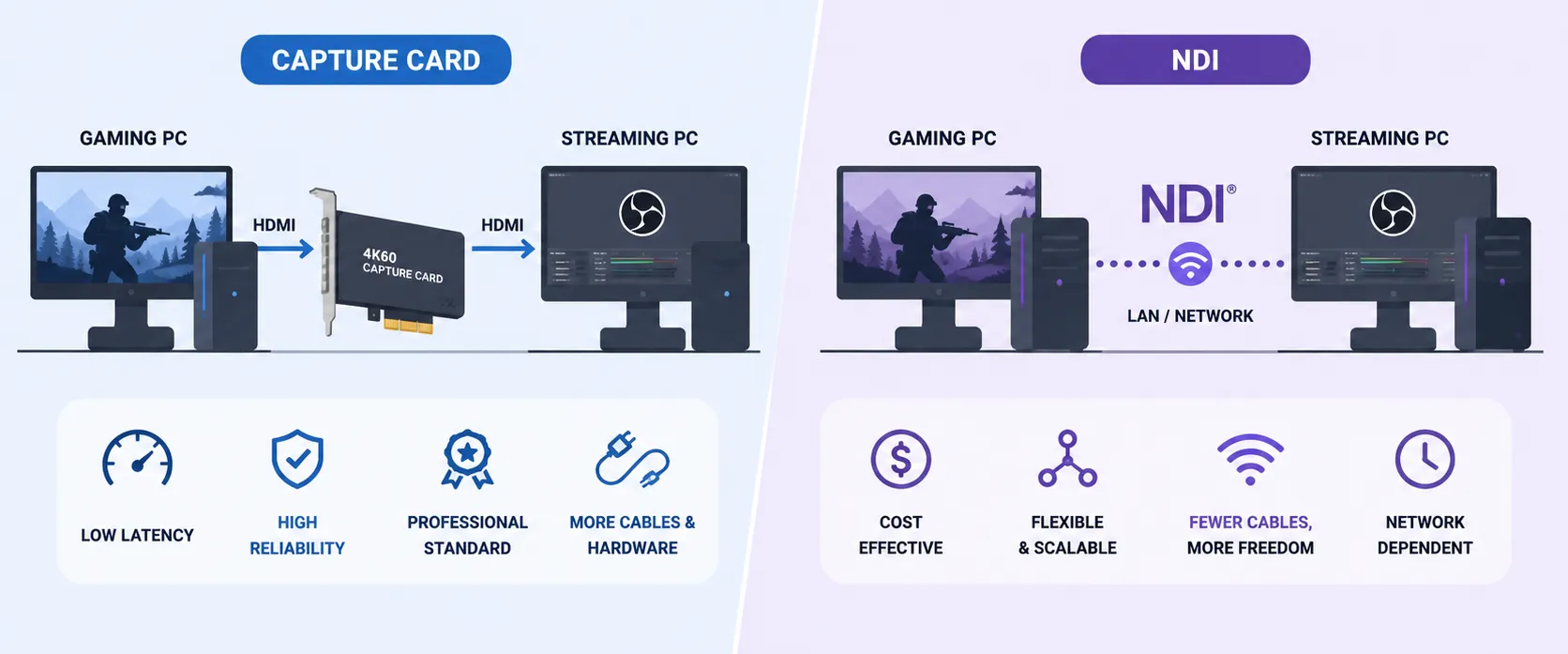
A capture card is a hardware device that transfers video and audio from your gaming PC to your streaming PC.
In a traditional dual-PC setup:
- Gaming PC runs the game
- Streaming PC handles encoding and broadcasting
- Capture card transfers video between them
Popular capture cards include:
- Elgato 4K60 Pro
- AVerMedia Live Gamer 4K
- Magewell Pro Capture HDMI
Think of a capture card as a dedicated highway built specifically for video signals. Its only job is moving video reliably from one machine to another.
Benefits of Capture Cards
- Extremely low latency
- High reliability
- Consistent video quality
- Minimal network dependency
- Professional broadcast standard
Drawbacks
- Additional hardware cost
- More cables
- Installation complexity
- Potential compatibility issues
What Is NDI in a Dual PC Streaming Setup?
NDI (Network Device Interface) is a video-over-IP technology developed by Vizrt through its NDI ecosystem.
Instead of sending video through HDMI cables and capture cards, NDI sends video over your local network.
In a dual-PC setup:
- Gaming PC generates video.
- NDI transmits the feed across Ethernet.
- Streaming PC receives the feed.
- OBS or another encoder broadcasts the stream.
Benefits of NDI
- No capture card required
- Lower upfront costs
- Flexible routing
- Fewer cables
- Easy scaling for multiple sources
Drawbacks
- Depends heavily on network quality
- Higher latency than capture cards
- Can consume significant bandwidth
- More troubleshooting variables
⚖️ Capture Card vs NDI for Dual PC Streaming: Side-by-Side Comparison
| Feature | Capture Card | NDI |
|---|---|---|
| Initial Cost | Higher | Lower |
| Hardware Required | Yes | No |
| Latency | Very Low | Low to Moderate |
| Reliability | Excellent | Network Dependent |
| Setup Complexity | Moderate | Moderate |
| Scalability | Limited by hardware | Highly scalable |
| Cable Management | More cables | Fewer cables |
| Video Quality | Excellent | Excellent on strong networks |
| CPU Usage | Lower | Slightly higher |
| Professional Broadcast Use | Common | Increasingly common |
🚀 Is NDI Better Than a Capture Card for Streaming?
The answer depends on your use case.
For Competitive Gaming
Capture cards usually win.
Fast-paced titles like:
- Counter-Strike 2
- Valorant
- Call of Duty: Warzone
benefit from the lowest possible latency.
Even small delays can affect production timing when managing cameras, overlays, and gameplay simultaneously.
For Content Creators on a Budget
NDI often wins.
If you're producing:
- Podcasts
- Talk shows
- Educational streams
- Webinars
- Interview broadcasts
the slight latency difference rarely matters.
Many creators save hundreds of dollars by leveraging existing network infrastructure.
📊 How Much Latency Does NDI Add?
This is one of the biggest misconceptions in streaming.
Many people assume NDI creates massive delays. Modern NDI implementations are much faster than early versions.
According to documentation from Vizrt, NDI was designed for real-time professional video transport across standard IP networks.
Typical latency ranges:
- Capture card: 1-2 frames
- NDI: 1-4 frames on optimized gigabit networks
The real issue isn't latency itself.
The real issue is latency consistency.
A capture card usually performs predictably. Network congestion can occasionally cause NDI performance fluctuations.
💡 Pro Tip
Use wired Gigabit Ethernet for NDI. Avoid Wi-Fi whenever possible. Even a powerful Wi-Fi 6 network can introduce unpredictable behavior during long broadcasts.
🖥️ Can You Stream on Two PCs Without a Capture Card?
Yes.
NDI was specifically designed to make this possible.
Basic NDI Workflow
- Install NDI tools on both PCs.
- Enable NDI output from OBS on gaming PC.
- Connect both systems through Gigabit Ethernet.
- Receive NDI feed on streaming PC.
- Encode and broadcast normally.
Many streamers successfully run dual-PC streaming setups without purchasing any capture hardware.
🔧 How Do You Set Up NDI for Dual PC Streaming?
Step 1: Connect Both PCs via Ethernet
Use:
- Gigabit Ethernet minimum
- 2.5GbE preferred
- Managed switch optional
Step 2: Install OBS
Most creators use:
Step 3: Install NDI Components
Install official NDI tools and plugins.
Step 4: Enable NDI Output
Configure your gaming PC to transmit video through NDI.
Step 5: Add NDI Source
On your streaming PC:
- Open OBS
- Add NDI Source
- Select gaming PC feed
Step 6: Test Before Going Live
Verify:
- Audio sync
- Frame rate
- Resolution
- Network utilization
🎯 Which Option Produces Better Video Quality?
This surprises many streamers.
Under ideal conditions, viewers often cannot tell the difference between:
- High-quality NDI
- Premium capture card workflows
According to official documentation from NDI, NDI supports visually lossless video transport for professional workflows.
The quality gap becomes noticeable only when:
- Network bandwidth becomes constrained
- Multiple NDI feeds compete for resources
- Packet loss occurs
For most creators streaming at:
- 1080p60
- 1440p
- Standard live broadcast bitrates
either solution can deliver professional results.
💰 Which Option Offers Better Value?
Capture Card Costs
Typical investment:
- Capture card: $150-$400+
- HDMI cables
- Additional accessories
NDI Costs
Typical investment:
- Existing network hardware
- Ethernet cables
- Software configuration
For creators building their first dual-PC setup, NDI often reduces startup costs significantly.
Common Misconception
Many streamers buy a capture card before evaluating their network.
That's like purchasing a second car before checking whether your current vehicle already solves the problem.
If your network infrastructure is solid, NDI may deliver everything you need without additional hardware spending.
📡 What Is the Best Dual PC Streaming Setup in 2026?
For most creators, the answer depends on content type.
Choose a Capture Card If:
- You stream esports competitively
- Reliability is mission-critical
- You produce professional client broadcasts
- Budget is less important than consistency
Choose NDI If:
- You want lower costs
- You already have Gigabit networking
- You run podcasts or talk shows
- You need flexible source routing
Hybrid Approach
Many professional studios use both.
They use:
- Capture cards for gaming feeds
- NDI for cameras
- NDI for remote guests
- NDI for graphics systems
This hybrid workflow provides maximum flexibility.
🎥 Where Does Yostream Fit Into Your Streaming Workflow?
Whether you choose NDI or a capture card, you still need a reliable way to distribute your live content.
Yostream is a browser-based live streaming and multistreaming platform that allows creators to broadcast to multiple destinations simultaneously without installing additional streaming software. For creators who want to simplify the distribution side of live streaming after their production workflow is set up, it provides a straightforward way to manage multi-platform broadcasts from a web browser.
This becomes particularly useful when your dual-PC setup is already complex and you want to reduce operational overhead elsewhere in the workflow.
❗ Warning: Common Mistakes Streamers Make
Mistake #1: Using Wi-Fi for NDI
Always prioritize wired networking.
Mistake #2: Buying Hardware Before Testing
Test NDI first if budget matters.
Mistake #3: Ignoring Network Traffic
Large file transfers can affect NDI performance.
Mistake #4: Choosing Based on YouTube Opinions Alone
Your network, content type, and workflow matter more than someone else's setup.
FAQ
1. What is better, NDI or a capture card?
A capture card is usually better for competitive gaming and professional broadcasts where ultra-low latency and reliability matter. NDI is often better for creators seeking flexibility and lower setup costs.
2. Does NDI reduce stream quality?
3. Can I use NDI and a capture card together?
Yes. Many advanced streaming setups combine both technologies. Capture cards handle gameplay while NDI handles cameras, graphics, and remote contributors.
4. How much bandwidth does NDI use?
Bandwidth varies by resolution and frame rate. Full-quality NDI streams can consume hundreds of megabits per second, making Gigabit Ethernet highly recommended.
5. Is NDI free to use?
NDI tools are available from the NDI ecosystem, though some advanced production tools may have licensing costs depending on the vendor.
6. Do professional broadcasters use NDI?
Yes. Broadcasters, houses of worship, sports productions, and corporate media teams increasingly use NDI as part of modern IP-based workflows.
7. Can NDI replace a capture card completely?
For many creators, yes. For esports and latency-sensitive productions, capture cards still offer advantages that make them difficult to replace entirely.
Readers Also Explored:
The ultimate guide to ZERO audio delay: How to Fix Audio Delay in a Dual PC Streaming Setup
The setup never got easier: OBS Is Not the Gold Standard Anymore. Here Is What Actually Changed
The stream is live: The State of Live Streaming 2026: Platform Shifts, Creator Economics, and What's Coming Next