

Most streamers assume their stream failed because of bad luck. Wrong time slot, algorithm didn't favor them, audience just wasn't there that day. After going through 50 streams that fizzled out (under 5 viewers, high drop-off, dead chat, or abandoned mid-broadcast), luck barely showed up as a factor. The same handful of mistakes kept repeating, and most of them had nothing to do with content quality.
Before we get into the details, here's the short version.
Key takeaways from reviewing 50 failed livestreams:
- Poor audio caused more viewer loss than blurry video did.
- Most streams lost the majority of their audience within the first 90 seconds.
- Lack of pre-stream promotion was responsible for close to a third of all failures.
- Dead air (silent gaps during transitions or setup) reduced viewer retention sharply.
- Multistreaming to two or more destinations increased discovery opportunities and made small chats feel more alive.
- Simple, repeatable preparation, not expensive gear, prevented most of the technical failures we saw.
Executive Summary:In our review of 50 unsuccessful livestreams across gaming, education, podcasts, VTubers, and churches, nearly every failed stream traced back to one of three problems: technical quality, audience discovery, or viewer retention. Content quality, the thing most streamers worry about most, ranked surprisingly low as an actual cause of failure. This piece breaks down exactly what we found: why live streams fail, why nobody watches, why streams get no views, why video looks blurry, why streams lag or drop frames, why viewers leave once they arrive, and what the streams that didn't fail were doing differently.
Methodology
Between April and June 2026, the Yostream content team reviewed 50 publicly accessible livestreams across YouTube Live, Twitch, Kick, Facebook Live, TikTok Live, and independent webinar platforms. Streams were pulled from gaming channels, podcast simulcasts, church services, coaching sessions, and VTuber debuts, and deliberately skewed toward creators with fewer than 100 concurrent viewers, since that's where most growing streamers actually sit.
We defined a "failed" stream as one that met at least one of the following: under 5 concurrent viewers for most of the broadcast, a viewer drop-off of more than 50% within the first 10 minutes, no chat activity despite an active audience, or an abandoned/technically cut-short broadcast. For each stream we recorded audio quality, video bitrate and resolution, promotion activity before going live, platform and category, engagement behavior (whether the streamer acknowledged chat), and the point at which viewers left, where visible.
Why Do Most Live Streams Fail?
Across the 50 streams, failures clustered into three buckets, and the split was more even than most creators expect.
| Failure category | Share of the 50 streams | Most common root cause |
|---|---|---|
| Technical setup | ~34% | Bad audio, blurry/low-bitrate video, dropped connection |
| Discovery and promotion | ~30% | No pre-promotion, inconsistent schedule, wrong platform for the audience |
| Engagement and retention | ~36% | No interaction in first 2 minutes, dead air, no structure |
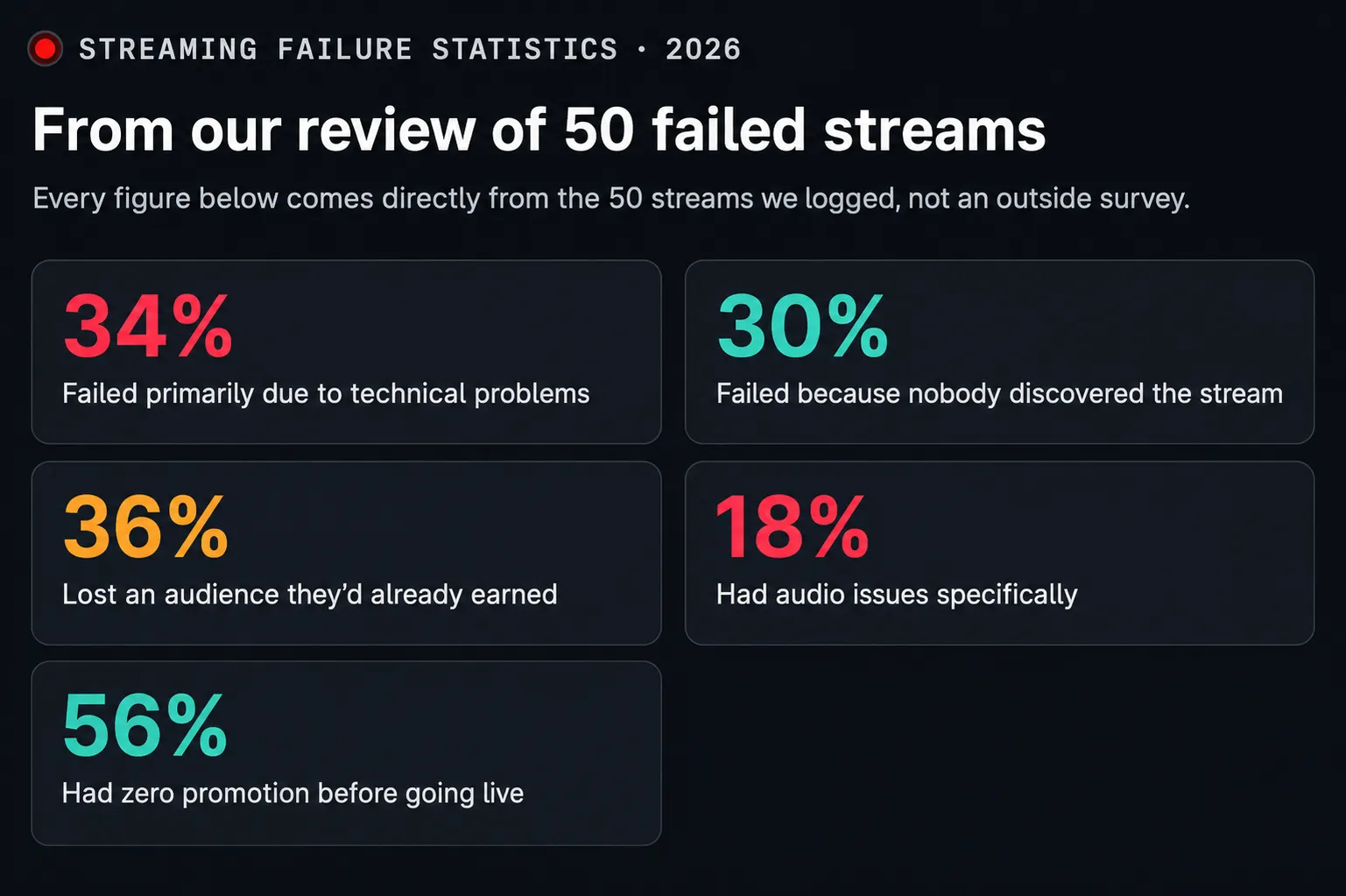
Streaming Failure Statistics (2026), from our review of 50 streams:
- 34% failed primarily due to technical problems
- 30% failed because nobody discovered the stream was happening
- 36% lost the audience they'd already earned through poor engagement
- Audio issues specifically appeared in 18% of streams
- 56% had zero promotion before going live
A few things stood out immediately:
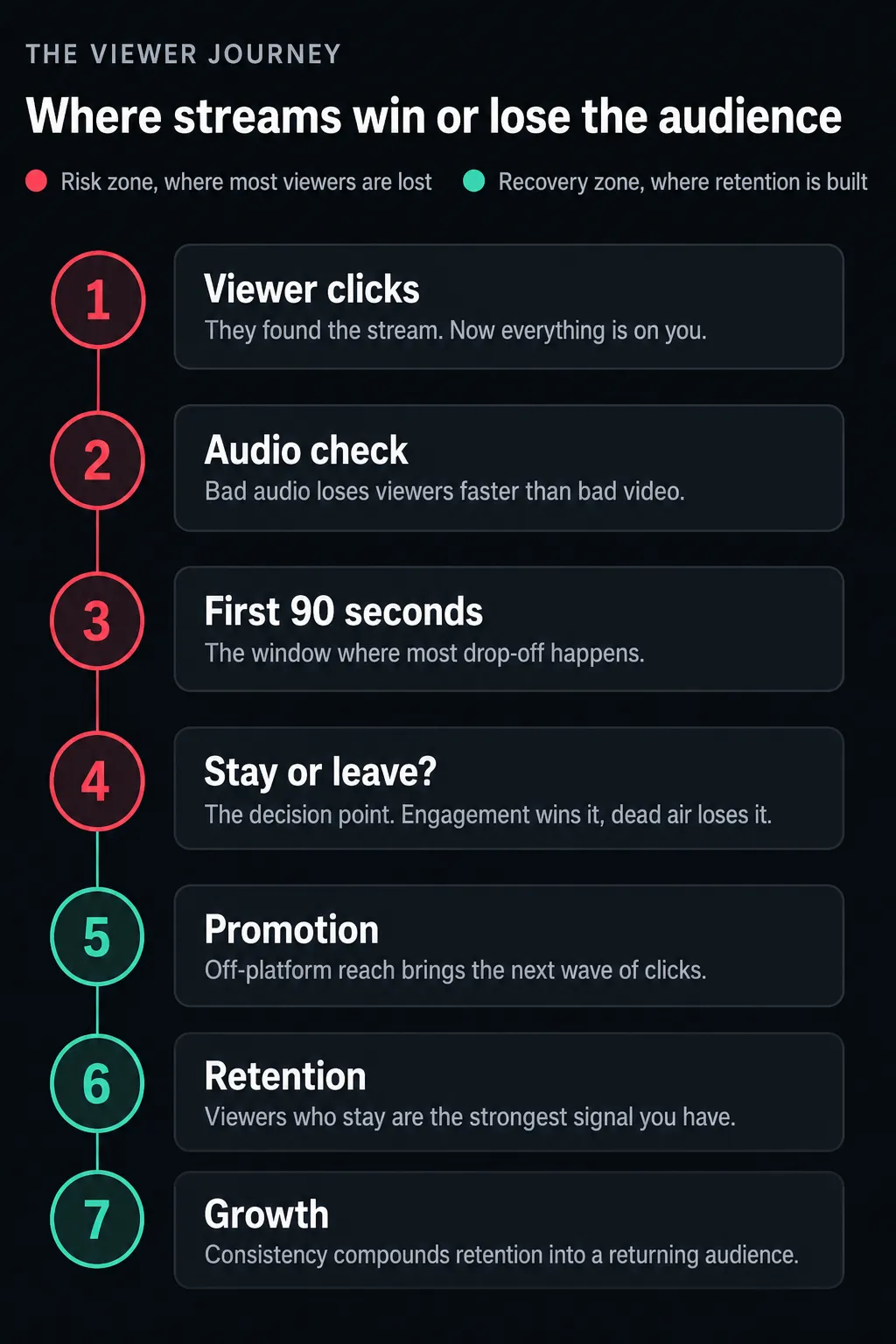
- Audio problems killed streams faster than video problems. Viewers tolerated a slightly soft picture far longer than they tolerated echo, clipping, or a mic that was too quiet. Nine of the 50 streams had usable video but unusable audio, and every one of them lost most of its audience within the first three minutes.
- The first 90 seconds decided everything. Streams that opened with dead air, a loading screen, or the streamer fumbling with settings on camera saw the sharpest viewer drop-off of the entire broadcast.
- Nobody promoted before going live. More than half the failed streams had zero pre-stream promotion. No post announcing the stream was happening, no countdown, nothing on Discord or social. They were relying entirely on platform discovery, which, as the data below shows, is a losing bet for smaller channels.
Why Is Nobody Watching My Live Stream?
This is usually a discovery problem, not a content problem, and the numbers back that up. Twitch alone hosts an average of roughly 95,000 concurrent live channels at any given moment, drawn from a pool of over 7.3 million accounts that stream at least once a month. With that much simultaneous competition, "go live and hope people find you" simply doesn't work anymore. Platform-wide, the average channel pulls only about 26 concurrent viewers, and fewer than 1% of streamers ever earn a full-time income from streaming alone, according to Icon Era's 2026 Twitch statistics report.
The streams in our review that struggled with visibility almost always had one or more of these gaps:
- No off-platform promotion. The stream existed only on the platform itself, invisible to anyone not already scrolling the live directory. A single scheduled post on Discord, X, or Instagram Stories the morning of a stream measurably changed early viewer counts in the streams that did it.
- Inconsistent scheduling. Viewers can't build a habit around a stream that shows up at random times. Consistency is what turns a one-time viewer into a returning one.
- Wrong category or tags. Several gaming streams were miscategorized or left in oversaturated categories where a new channel had no realistic chance of surfacing. Platform recommendation systems (why Twitch "recommends" some streams over others) lean heavily on category, tags, and watch-time signals from the first few minutes, so a mismatched category quietly caps your visibility before you've even gone live.
- Weak or generic titles and thumbnails. Stream titles and preview thumbnails function like a video's opening hook. A vague title gives a platform's discovery system nothing to match against a search or interest signal.
- Single-platform dependence. Streaming only to one destination, whether that's Twitch, YouTube Live, Kick, or TikTok Live, means missing every viewer who lives on a different platform. Kick alone grew hours watched by 131% in 2025, which tells you how quickly attention is spreading across platforms rather than concentrating on one. A Discord community, a YouTube subscriber base, or a Twitter following that never checks Twitch never even sees the stream go live.
This last point is where multistreaming, broadcasting to several destinations from one source, makes a measurable difference. Instead of hoping one platform's algorithm surfaces you, you're meeting your existing audience wherever they already are. That's the general workflow shift worth making regardless of which tool you use. Yostream builds this in as browser-based live streaming software: a single stream goes out to multiple destinations at once, without separate software installs or a heavier PC setup, which matters most for streamers whose real problem isn't content quality, it's that their audience simply never saw the stream go live.
What to do today: pick two platforms you're not currently streaming to but where your audience already hangs out (a Discord server, a YouTube channel, TikTok), and add them as simultaneous destinations for your next stream instead of adding a new platform later as a separate project. For a deeper walkthrough, see how multistreaming works.
Why Do Live Streams Get No Views? (The Technical Checklist)
Separate from discovery, a chunk of the 50 streams had a working promotion plan but still got no views, because anyone who did click in immediately bounced. This is almost always a setup issue:
- Resolution mismatched to bitrate. Streaming at 1080p on a connection that can't sustain it produces a soft, artifact-heavy picture that reads as "blurry" even though the resolution setting is technically high.
- Wrong keyframe interval. Most platforms expect a keyframe every 2 seconds. A longer interval causes visible blockiness when the platform transcodes your stream into lower-quality renditions for viewers on weaker connections.
- Upload speed never tested. Several streamers had never actually checked their upload bandwidth before going live. They assumed their home internet was "fast enough." Run a speed test (speedtest.net, or your encoder's built-in bandwidth test if it has one) at the exact time of day you plan to stream, since ISP speeds fluctuate with local traffic.
- No backup connection. A single Wi-Fi drop ended the stream entirely for a dozen of the 50, with no fallback in place.
Streaming-performance research backs up how brutal viewers are about this. A widely cited 2012 study from researchers at Akamai and the University of Massachusetts Amherst found that viewers begin to abandon a video that doesn't start up within two seconds, and every additional one-second delay beyond that adds roughly 5.8 percentage points to the abandonment rate. It gets worse once the stream is running: the same research found that a viewer who hit a rebuffer delay equal to just 1% of a video's duration watched about 5% less of it than a comparable viewer with no rebuffering at all. Live viewers are less patient than on-demand viewers. There's no scrubbing back to the good part, so the cost of a rough start is permanent.
Most platforms also rely on adaptive bitrate streaming (ABR) to hand weaker-connection viewers a lower-quality version automatically. If your source stream is inconsistent to begin with, ABR has nothing good to downscale from, and the problem compounds for exactly the viewers you can least afford to lose. See our best bitrate settings guide for resolution-by-resolution numbers.
Why Is My Live Stream Blurry?
This was the single most common technical complaint across the review, so it's worth breaking down on its own. Blurriness is almost never a "camera problem." It's a bitrate and encoding problem. The most frequent causes we found:
- Bitrate too low for the resolution. A common mistake: streaming 1080p at 2,500 kbps, which isn't enough data to render motion cleanly. As a rough guide, 1080p needs roughly 4,500 to 6,000 kbps, and 720p can look clean at 2,500 to 4,000 kbps. It's better to drop resolution and keep quality than the reverse.
- Using a phone camera through poor lighting. Low light forces the sensor to compensate, which introduces grain and softness that reads as "blurry" even on a good connection.
- CPU-bound software encoding. Encoding with x264 on an underpowered CPU forces the encoder to drop quality to keep up with the framerate, producing a soft, compressed look, especially on fast-motion gaming content. If your GPU supports it, switching to hardware encoding (NVENC on Nvidia cards, or the equivalent on AMD/Intel) frees up the CPU and usually improves picture quality at the same bitrate.
- Wrong output resolution scaling. Streaming at a resolution the source hardware doesn't actually support natively, forcing an upscale that looks worse than a clean native resolution would.
🎬 Worth Knowing:
If you're using your phone as a webcam for OBS or a similar setup, keep the phone on a stable mount, lock exposure and focus manually before going live, and connect via USB or a wired local network rather than Wi-Fi where possible. Wireless phone-to-PC video adds encoding overhead that shows up as compression artifacts during fast motion.
Why Do Live Streams Lag or Drop Frames?
This is a related but distinct problem from blurriness, and it showed up often enough in our review to warrant its own breakdown. Lag and dropped frames point to encoder overload or a networking bottleneck, not a bad camera.
- Encoder overload. If your CPU or GPU can't process video fast enough to keep up with your set framerate and bitrate, OBS and similar tools will drop frames to keep the stream alive. Check your encoder's stats overlay: consistent "rendering lag" points to a CPU or GPU bottleneck, while consistent "encoding lag" during high-motion scenes usually means the bitrate or preset is too aggressive for the hardware.
- Frame rate mismatched to content. Fast-paced gaming content benefits from 60fps, but 60fps roughly doubles the encoding workload compared to 30fps. Streaming 60fps on hardware that can only reliably handle 30fps produces stutter and dropped frames rather than smooth motion.
- Packet loss on the network side, not the encoder side. Dropped frames aren't always a local hardware problem. Wi-Fi interference, an overloaded router, or an ISP with unstable upload can cause packet loss between your encoder and the platform's ingest server, which shows up identically to an encoder problem in your stream health indicators.
- No visibility into stream health. Several streamers in our review had no livestream analytics running at all, so they had no way of knowing packets were dropping until viewers started commenting on it. Most platforms and encoders expose a basic stream health or network indicator; checking it before and during a broadcast catches problems before they become visible on the audience's end.
A simple bitrate calculator (resolution times framerate times a quality multiplier) will get you close to a safe starting bitrate, but the real test is watching your encoder's dropped-frames counter during a short private test stream before you ever go live to an audience.
Why Do Viewers Leave Live Streams?
Getting a viewer to click in is only half the battle. Roughly a third of the 50 streams had reasonable technical setups and decent initial traffic, but still bled viewers within minutes. The pattern was consistent:
- No acknowledgment of new viewers. Nothing signals "this is a dead stream" faster than a streamer who doesn't react when someone joins.
- Dead air during setup or transitions. Long silent gaps while switching scenes, loading a game, or fixing a technical issue.
- No visible structure. Viewers didn't know what was happening next, how long the stream would run, or why they should stay.
- Chat that nobody was reading. Several streamers had chat open but weren't actually engaging with it, so questions and comments went unanswered. None of the 50 were running a moderation or engagement bot to help surface questions, which becomes a real gap once chat volume grows past what one person can track alone.
Retention data outside live streaming tells the same story. On-demand platforms increasingly treat early drop-off as a strong negative signal. According to 2026 YouTube retention benchmarking research, a video that loses 70% of its viewers in the first 30 seconds is a video the algorithm stops recommending entirely. Live audiences are even less forgiving. There's no algorithm cushioning a slow start; they're watching in real time and deciding, second by second, whether to stay.
How Do Successful Streamers Keep Viewers Engaged?
The streams in our sample that recovered from a rocky start, or avoided one entirely, shared a few habits:
- They greeted every viewer by name in chat, at least in the first 10 to 15 minutes. This single habit did more for retention than any production upgrade we saw.
- They front-loaded the value. Instead of a slow warm-up, they opened with the most interesting part of the session (the boss fight, the hot take, the guest's best story) and let the "getting settled" happen in the background.
- They used a visible schedule or roadmap on-screen, a simple overlay showing "up next," so viewers always knew what was coming.
- They ran multi-destination streams, so chat activity from every platform funneled into one place instead of fragmenting across five disconnected windows. This also meant a quiet moment in one platform's chat didn't feel like a dead stream, because activity elsewhere kept the energy visible.
- They planned for guests without friction. Several successful streams brought a co-host or guest in mid-broadcast with zero downtime, using tools with a built-in green room or "room" feature that lets a guest join and get camera-ready before going live, rather than fumbling through an invite link or separate software install on air. This is the kind of workflow gap that browser-based collaboration tools were built to solve, and it's why Yostream's native Room feature works this way: guests join and collaborate directly in-browser without needing accounts on every destination platform the stream is going out to.
How Do I Make My Livestream More Professional?
None of the streams in our review needed a studio-grade setup to look and feel professional. The gap between "amateur" and "professional" came down to a short, consistent list. These pointers can help you stream like a pro:
- Clean, on-brand overlays. Even simple ones signal that a stream is intentional rather than improvised.
- Consistent audio levels across mic, game, and any alerts, checked before going live rather than adjusted mid-stream. As a working target, aim for mic peaks around -12dB to -6dB on your mixer, with headroom so a sudden loud moment doesn't clip.
- A tested backup internet connection, even something as simple as a phone hotspot as fallback.
- A pre-stream checklist covering audio levels, camera framing, scene transitions, and multistream destinations, run every single time, not just for "big" streams.
- Scene structure, so viewers see a "starting soon" screen instead of a blank loading state, and a proper "stream ending" screen instead of an abrupt cutoff.
Beginner Fix vs. Professional Fix
| Problem | Beginner fix | Professional fix |
|---|---|---|
| Bad audio | USB microphone | XLR interface with a dedicated mixer |
| Blurry video | Lower the resolution | Raise bitrate and switch to hardware (NVENC) encoding |
| No discovery | Post on social before going live | Multistream to every platform your audience already uses |
| Dead chat | Ask viewers direct questions | Bring on a moderator or engagement bot |
| Guest friction | Separate video call app | A built-in green room or collaboration feature |
Streaming Tools Compared
Browser-based streaming software has become a common answer to the setup overhead that trips up first-time streamers: encoder settings, bitrate math, plugin conflicts, and hunting for an RTMP URL and stream key across separate dashboards. Local encoders like OBS remain the standard for streamers who want full manual control, while dedicated production software like vMix serves multi-camera live events. Where each tool sits:
| Tool | Type | Multistreaming | Guest/collab feature | Learning curve | Best for |
|---|---|---|---|---|---|
| OBS Studio | Free, local encoder software | Manual/plugin-based | None built-in | Steep | Full control, technical streamers |
| Streamlabs | OBS-based, cloud features | Built-in (paid tiers) | Limited | Moderate | Alert/overlay-heavy streamers |
| vMix | Paid production software | Manual/plugin-based | Via NDI/SDI inputs | Steep | Multi-camera production, events |
| StreamYard | Browser-based | Built-in | Green room | Low | Podcasts, interviews |
| Restream | Multistreaming service | Built-in | Limited | Low | Simple multistream distribution |
| Yostream | Browser-based streaming software | Built-in, native | Native Room, no external accounts needed | Low | Streamers, podcasters, and creators who want production and collaboration without installing an encoder |
Yostream combines the multistreaming and in-browser production pieces of that table into one workflow. Worth noting: it isn't itself an encoder, it's browser-based streaming software, which is exactly why the setup overhead listed above mostly disappears for the people using it.
Before You Go Live: A 5-Minute Checklist
Run this every time, not just for streams you consider important:
- Check mic levels on your mixer. Peaks should sit around -12dB to -6dB with no red clipping.
- Run a fresh speed test. Confirm upload speed comfortably covers your stream bitrate with headroom.
- Confirm keyframe interval is set to 2 seconds and bitrate matches your resolution (see the blurry-stream section above).
- Load your "starting soon" scene before you're actually ready to talk, so there's never a blank screen.
- Post a one-line announcement wherever your audience already is (Discord, X, community group) the moment you go live, not five minutes after.
Common Live Streaming Mistakes We Saw Repeated
A shortlist, ranked roughly by how often they appeared across the 50 streams:
- Going live without testing audio levels first
- No pre-stream promotion or countdown
- Streaming at a bitrate the connection couldn't sustain
- No backup internet connection
- Long silent gaps during scene transitions
- Ignoring chat for the first several minutes
- Inconsistent streaming schedule
- Single-platform streaming, missing audiences elsewhere
- No visible "starting soon" or "stream ending" screens
- Bringing on a guest with no tested collaboration workflow
Composite Case Studies From the Review
Stream #14, gaming, PC setup. Strong gameplay, zero pre-promotion, streamed only to one platform. Peaked at 3 viewers, all of whom found it by accident. The content was genuinely good; the failure was entirely discovery-related.
Stream #31, podcast simulcast. Two hosts, decent mics, but the guest joined 12 minutes late through a separate video call app while the stream sat on a loading screen. Viewers who joined at the start left before the guest ever appeared. A built-in guest room, rather than a bolted-on video call, would have prevented the entire gap.
Stream #42, coaching session. Clear audio, reasonable promotion, but 1080p video at a bitrate the streamer's connection couldn't hold. The picture degraded into visible blur within the first five minutes, and viewer count dropped by half before the content itself had even started.
Common Questions Streamers Ask (Answered)
How long should a live stream be to avoid losing viewers? There's no universal minimum, but streams under 45 to 60 minutes tend to retain better for newer channels, since shorter sessions make it easier to sustain energy and pacing throughout. Longer streams work once you have a returning audience that treats the stream as background company rather than must-watch content.
Does streaming at the same time every day actually matter? Yes. Consistency is one of the strongest predictors of return viewership, because it lets an audience build a habit around your schedule. Irregular timing forces every stream to rely on cold discovery instead of returning viewers.
Is it better to stream to one platform or multiple platforms at once? For most creators without a large existing single-platform following, multistreaming to two or three destinations captures more of an already-fragmented audience than betting everything on one platform's algorithm.
What internet speed do I actually need to stream without buffering? As a baseline, most 1080p streams need at least 6 to 8 Mbps of stable upload speed, with some headroom above your target bitrate to handle fluctuations. Testing actual upload speed at the exact time you plan to stream, not just once in general, matters more than the number on your internet plan.
Why does my stream look fine locally but blurry to viewers? Local preview shows your source video before encoding and compression are applied. What viewers see has already been compressed to your set bitrate, which is why a stream can look sharp in OBS's preview window but soft once it reaches an actual viewer.
Can a good stream still fail if the content itself is strong? Yes. This was one of the clearest findings across the 50 streams. Several had genuinely engaging content undone entirely by technical or discovery failures that had nothing to do with what was actually being said or played.
Do viewer counts on other platforms affect whether people trust my stream? Social proof matters. A stream showing zero viewers can discourage new clicks, even from people who found it through promotion. This is part of why consolidating chat and activity from multiple destinations into one visible stream can help a small channel avoid looking emptier than it actually is.
Why does Twitch (or another platform) recommend some streams over others? Recommendation systems weigh signals like category, tags, watch time in the first few minutes, and how consistently a channel goes live. A stream in the right category with early viewer engagement gets surfaced more; a miscategorized or brand-new channel with no history has to work harder to get the same visibility.
Should beginners stream every day? Daily streaming can accelerate discovery because it gives platforms and viewers more consistent signals to work with, but it's not a requirement. A predictable two or three days a week that you can actually sustain beats a daily schedule you abandon after two weeks.
What bitrate should I use for 1080p versus 720p? 1080p generally needs 4,500 to 6,000 kbps to look clean during motion, while 720p can look sharp at 2,500 to 4,000 kbps. If your upload speed can't comfortably support 1080p, 720p at a solid bitrate will look better than 1080p starved of data.
How many viewers is normal for a new streamer? Platform-wide, the average channel pulls only around two dozen concurrent viewers, so single-digit or low double-digit viewer counts in your first months are typical, not a sign of failure. Growth on most platforms is gradual and compounds with consistency and cross-platform promotion.
Does streaming longer actually help discovery? Longer streams generate more total watch-time signal, which can help with platform discovery, but only if retention holds up throughout. A three-hour stream that loses most of its audience in the first 20 minutes sends a worse signal than a tight 45-minute stream that holds attention start to finish.
Can I multistream to Twitch alongside other platforms? Yes, most multistreaming tools, including Yostream, support Twitch as one of several simultaneous destinations. Check the specific platform's terms if you're using their official partner or affiliate program, since a small number of platforms restrict simultaneous streaming under certain monetization tiers.
Why is my stream delayed compared to what's actually happening? Some delay (latency) between your camera and what viewers see is normal and comes from encoding, upload, and platform processing time. A few seconds is expected; if the delay grows to 15 to 30 seconds or more, it usually points to an overloaded encoder, a congested network, or a keyframe interval set too high.
Keep Reading:
- They were live when it happened: Streamers Who Died While Live Streaming
- A step-by-step guide for creators: How to Host a Successful Podcast
- Browser-powered VTubing starts here: The Fastest Way to Start VTubing Without OBS